


Introduction
The Smores newsletter has become one of the most popular tools for creating visually appealing digital newsletters without requiring advanced design or coding skills. Whether you’re a teacher, school administrator, nonprofit organization, or business owner, Smores makes it easy to build engaging newsletters that keep your audience informed.
Unlike traditional email newsletters that often contain plain text, a Smores newsletter combines attractive layouts, images, videos, buttons, and interactive elements into a single webpage that is easy to share. This modern approach helps capture readers’ attention while making important information more enjoyable to read.
In this guide, we’ll explore what a Smores newsletter is, its key features, benefits, best practices, and why it has become a favorite communication platform for educators and organizations around the world.
What Is a Smore Newsletter?
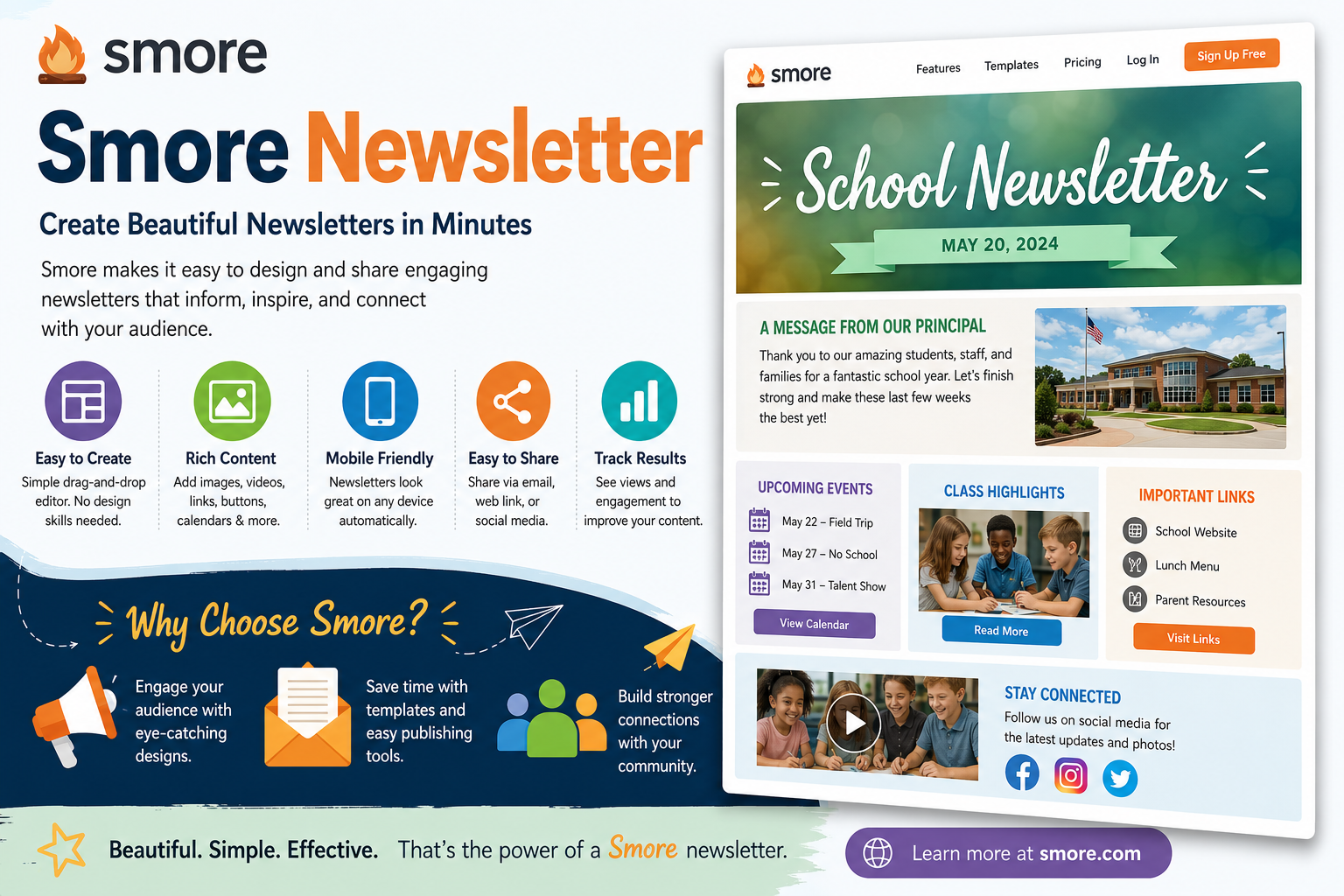
A Smores newsletter is a digital newsletter created using the Smores platform, which allows users to design professional-looking online newsletters through an easy drag-and-drop interface. Instead of sending lengthy emails filled with plain text, users can create visually engaging pages that include photos, videos, calendars, announcements, links, and downloadable documents.
One of the biggest advantages of a Smores newsletter is its accessibility. Readers can open the newsletter from computers, tablets, or smartphones without needing special software. The responsive design automatically adjusts to different screen sizes, creating a consistent experience across devices.
The platform is especially popular in education because teachers and schools use it to communicate classroom updates, homework assignments, event announcements, and school news. However, businesses, clubs, nonprofits, and community organizations also benefit from its flexible design tools.
Key Features of a Smore Newsletter
The Smores newsletter includes numerous features that simplify communication while improving visual appeal. Users can choose from professionally designed templates, customize colors and fonts, add multimedia content, and organize information into clearly structured sections.
Another useful feature is the ability to embed videos, social media posts, maps, forms, and external links directly into the newsletter. These interactive elements encourage readers to spend more time engaging with the content instead of simply scrolling through text.
Analytics are another strength of the Smores newsletter platform. Users can often track views, clicks, and reader engagement, helping them understand which content performs best and improve future newsletters based on audience behavior.
Benefits of Using a Smore Newsletter
One reason many organizations choose a Smores newsletter is its simplicity. Even users with no graphic design experience can create attractive newsletters within minutes by using built-in templates and customization options.
The visual presentation also improves communication. Images, videos, headings, buttons, and organized layouts make information easier to read and understand compared to long blocks of plain text. Readers are more likely to engage with visually appealing content.
Finally, a Smore newsletter saves time while maintaining professionalism. Instead of designing newsletters from scratch, users can update templates, duplicate previous newsletters, and publish new content quickly, making regular communication far more efficient.
Who Can Benefit From a Smore Newsletter?
The Smore newsletter is widely used across many industries because of its flexibility and ease of use. Schools are among the biggest users of the platform, with teachers creating classroom newsletters, principals sharing school-wide announcements, and districts keeping parents informed about important events. The clean design and mobile-friendly layout make communication more effective.
Businesses can also benefit from a Smores newsletter by sharing company updates, product launches, employee announcements, and marketing campaigns. Instead of sending plain emails, companies can create visually engaging newsletters that encourage readers to interact with the content and visit their websites.
Nonprofit organizations, sports teams, community groups, and clubs also use the Smores newsletter to promote events, recruit volunteers, and share success stories. The platform’s simple editor makes it easy for organizations of all sizes to produce professional-looking communications.
Best Practices for Creating an Effective Smore Newsletter
Creating a successful Smores newsletter starts with choosing a clean and organized layout. Avoid overcrowding the page with too much information, and instead divide content into sections with clear headings. This makes it easier for readers to scan the newsletter and quickly find the information they need.
High-quality visuals are another important part of an effective Smores newsletter. Using clear photos, short videos, and eye-catching graphics can increase reader engagement while making the newsletter more appealing. However, visuals should always support the content rather than distract from it.
Consistency is equally important. Publishing a Smores newsletter on a regular schedule helps build trust with your audience. Whether you send newsletters weekly or monthly, maintaining a predictable schedule encourages readers to look forward to future updates.
Why the Smore Newsletter Is Popular
The popularity of the Smores newsletter comes from its ability to combine professional design with user-friendly editing tools. Users do not need coding knowledge or advanced graphic design skills to create attractive newsletters that look polished and engaging.
Another reason for its success is its flexibility. A Smores newsletter can include announcements, event calendars, videos, photo galleries, downloadable files, buttons, and links—all within one easy-to-navigate page. This versatility makes it useful for many different communication needs.
The platform also supports collaboration and sharing. Newsletters can be distributed through email, websites, or social media, allowing organizations to reach audiences through multiple channels while maintaining a consistent message.
Common Mistakes to Avoid
Although creating a Smores newsletter is simple, there are still some mistakes to avoid. One common issue is adding too much text without enough headings or visuals. Breaking information into smaller sections improves readability and keeps readers engaged from beginning to end.
Another mistake is using low-quality images or outdated information. Keeping content current and visually appealing helps maintain professionalism and encourages readers to return for future newsletters.
Finally, always review your Smores newsletter before publishing. Checking for spelling mistakes, broken links, incorrect dates, and formatting issues ensures your final newsletter delivers a polished experience that reflects positively on your organization.
Frequently Asked Questions About Smore Newsletter
One of the most common questions about the Smores newsletter is whether it is only designed for schools. While the platform is especially popular among educators, it is also widely used by businesses, nonprofit organizations, sports teams, clubs, and community groups. Its flexible design tools make it suitable for almost any organization that wants to communicate effectively through visually appealing newsletters.
Another frequently asked question is whether a Smores newsletter requires technical skills to create. The answer is no. The platform uses a simple drag-and-drop editor, allowing users to add text, images, videos, buttons, calendars, and other interactive elements without needing coding or graphic design experience.
Many users also ask whether a Smore newsletter works well on mobile devices. Yes, newsletters are designed to be responsive, meaning they automatically adjust to different screen sizes. This ensures readers have a smooth experience whether they open the newsletter on a desktop computer, tablet, or smartphone.
Tips for Getting the Most From a Smore Newsletter
To maximize the effectiveness of your Smores newsletter, focus on creating content that is valuable to your audience. Include important updates, event announcements, helpful resources, and engaging visuals while keeping the layout clean and organized. A well-structured newsletter encourages readers to stay engaged from beginning to end.
Another useful tip is to include clear call-to-action buttons. Whether you want readers to register for an event, visit your website, complete a survey, or read another article, visible buttons help guide them toward the next step and improve overall engagement.
Finally, review your newsletter regularly using the platform’s analytics when available. Understanding which sections receive the most clicks or views allows you to improve future editions and create content that better matches your audience’s interests.
Conclusion
The Smores newsletter has become one of the most effective tools for creating professional, visually engaging digital newsletters. Its easy-to-use editor, customizable templates, multimedia support, and responsive design make it an excellent choice for educators, businesses, nonprofits, and community organizations looking to improve communication.
Whether you’re sharing classroom updates, promoting business announcements, or organizing community events, a Smores newsletter provides an attractive and user-friendly way to connect with your audience. By combining engaging visuals with organized content, it helps ensure your message is both informative and memorable.
As digital communication continues to evolve, the Smores newsletter remains a practical solution for anyone who wants to create high-quality newsletters without requiring advanced technical skills. With thoughtful planning, consistent publishing, and engaging content, it can become a valuable part of any communication strategy.