


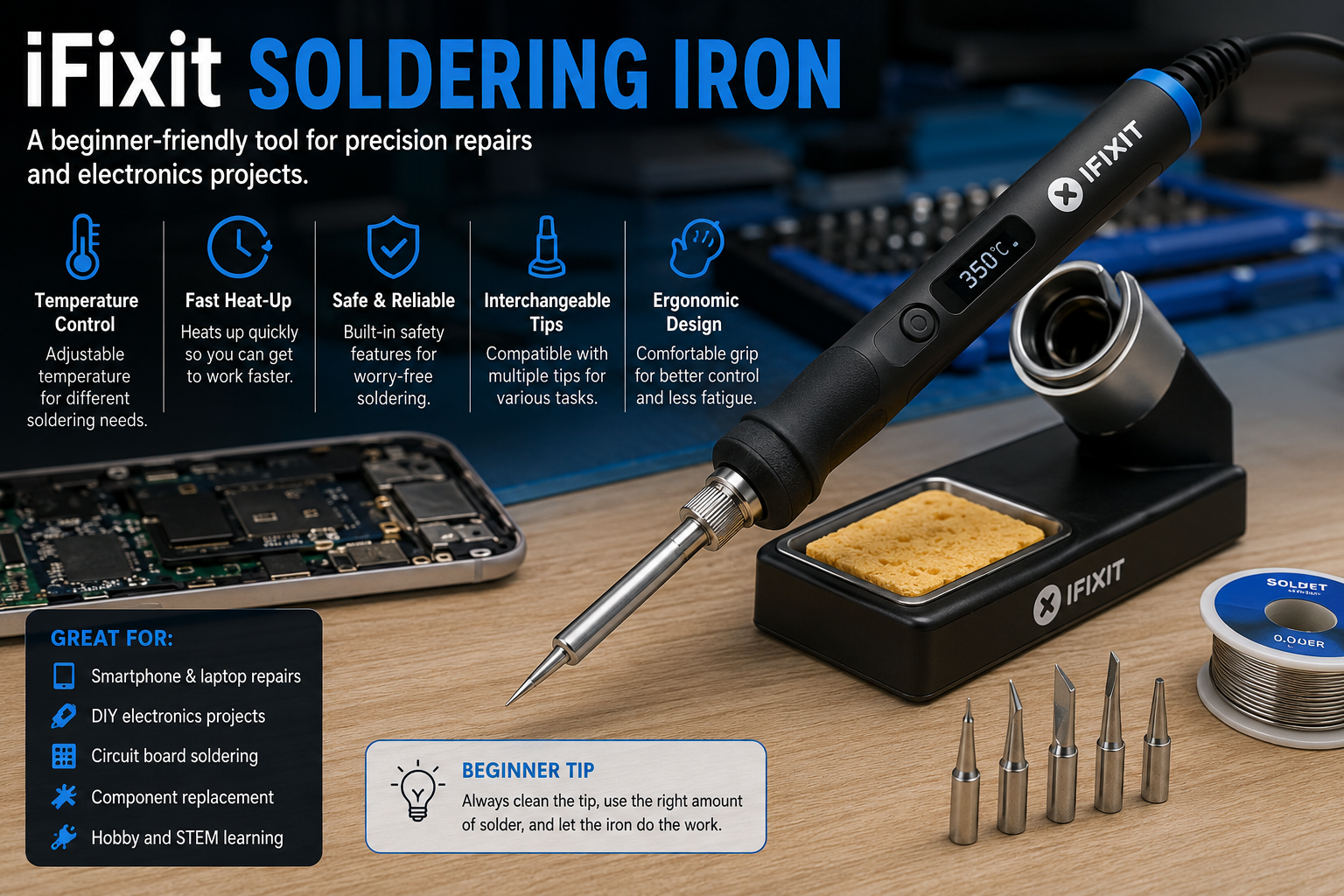
Whether you’re repairing electronics, building DIY projects, or learning a valuable technical skill, having the right soldering tool makes all the difference. The iFixit soldering iron has become a popular choice among beginners because it combines ease of use, dependable performance, and repair-focused features in a beginner-friendly package. Instead of struggling with outdated equipment, new users can learn soldering with greater confidence and precision.
Soldering may seem intimidating at first, but a quality tool simplifies the learning process. The iFixit soldering iron is designed to provide consistent heat, comfortable handling, and compatibility with common electronics repair tasks. These features help reduce mistakes while allowing users to develop proper soldering techniques from the beginning.
In this complete guide, you’ll learn everything you need to know about the iFixit soldering iron, including its features, benefits, common uses, maintenance tips, and what to consider before buying one. Whether you’re repairing game controllers, replacing charging ports, or experimenting with electronics for the first time, this guide will help you understand why this soldering iron has gained so much attention.
What Is the iFixit Soldering Iron?
The iFixit soldering iron is a precision soldering tool created for electronics repair, maintenance, and DIY projects. Unlike inexpensive soldering irons that often suffer from inconsistent temperatures, this tool is designed to provide reliable heat control for delicate electronic components.
One reason the iFixit soldering iron stands out is its focus on repairability and ease of use. iFixit is well known for promoting the right-to-repair movement, and its products are intended to help users repair devices instead of replacing them. This philosophy is reflected in the soldering iron’s thoughtful design and practical features.
For beginners, the iFixit soldering iron offers an approachable starting point. It balances professional-level performance with user-friendly controls, making it suitable for learning basic soldering techniques while still being capable enough for more advanced repair work later on.
Why Beginners Choose the iFixit Soldering Iron
Learning to solder becomes much easier when using equipment that performs consistently. The iFixit soldering iron heats up quickly and maintains stable temperatures, allowing beginners to focus on developing good soldering habits rather than fighting unreliable tools.
Comfort also plays an important role during longer repair sessions. The lightweight design and ergonomic grip of the iFixit soldering iron help reduce hand fatigue, making it easier to maintain control while working on small circuit boards and delicate electronic components.
Another reason many newcomers prefer the iFixit soldering iron is the wealth of educational resources available from iFixit. Step-by-step repair guides, tutorials, and community support help users learn proper techniques while building confidence with each project.
Key Features of the iFixit Soldering Iron
One of the biggest strengths of the iFixit soldering iron is precise temperature control. Stable temperatures reduce the risk of overheating sensitive electronic components while producing cleaner and stronger solder joints.
Fast heat-up times are another valuable feature. Instead of waiting several minutes before starting a repair, the iFixit soldering iron reaches operating temperature quickly, improving workflow and making short repair sessions much more convenient.
Many models also support interchangeable soldering tips. This flexibility allows users to switch between fine-point tips for detailed electronics work and broader tips for larger solder joints. Having multiple tip options increases the versatility of the iFixit soldering iron for a wide variety of repair tasks.
Common Uses for the iFixit Soldering Iron
The iFixit soldering iron is commonly used for repairing consumer electronics. Smartphones, laptops, gaming controllers, keyboards, headphones, and other devices often require soldering during component replacement or connector repairs.
DIY electronics enthusiasts also appreciate the versatility of the iFixit soldering iron. Building custom mechanical keyboards, assembling Arduino projects, creating Raspberry Pi accessories, and working on hobby electronics all become easier with a dependable soldering tool.
Educational environments frequently use soldering irons for teaching electronics fundamentals. Because of its consistent performance and beginner-friendly operation, the iFixit soldering iron is well suited for students who are learning safe soldering practices for the first time.
Advantages of Using the iFixit Soldering Iron
A major advantage of the iFixit soldering iron is reliability. Consistent temperature output helps produce cleaner solder joints, reducing the chances of cold joints or accidental damage caused by overheating.
Portability is another benefit depending on the model. Some versions are compact enough to fit easily into a repair toolkit, making them convenient for technicians, hobbyists, and users who frequently work in different locations.
The iFixit soldering iron also encourages long-term learning. As your repair skills improve, the same tool remains capable of handling increasingly advanced projects. This means beginners won’t necessarily need to replace their equipment after gaining more experience.
Important Factors to Consider Before Buying
Before purchasing an iFixit soldering iron, it’s worth considering the types of projects you plan to complete. Someone repairing small smartphones may prioritize precision tips, while a hobbyist assembling larger electronic kits might prefer broader soldering tips.
Temperature range is another important consideration. A wider adjustable temperature range allows the iFixit soldering iron to handle various solder types and different electronic components safely without excessive heat.
You should also think about replacement tips, accessories, carrying cases, and overall compatibility with your repair setup. Choosing a complete kit often provides better value than purchasing individual tools separately, especially for beginners building their first electronics workstation.
How to Maintain an iFixit Soldering Iron
Proper maintenance helps your iFixit soldering iron perform consistently and extends its lifespan. One of the most important habits is cleaning the soldering tip after each use. A brass wool cleaner or a damp soldering sponge removes excess solder and oxidation, allowing heat to transfer more efficiently during your next project.
Keeping the tip properly tinned is equally important. Tinning means applying a thin layer of fresh solder to the tip before storing it or after cleaning. This protective layer reduces oxidation and helps the iFixit soldering iron maintain excellent heat conductivity over time.
When you’re finished soldering, allow the iron to cool naturally before storing it. Avoid wrapping the cable tightly around the handle, as repeated stress can shorten the cable’s lifespan. Storing the tool in a clean, dry location helps protect both the soldering iron and its accessories.
Essential Safety Tips for Beginners
Although the iFixit soldering iron is designed to be beginner-friendly, soldering always involves high temperatures. The tip can easily exceed several hundred degrees, so it’s important to handle the tool carefully and always place it in a stable soldering stand when not in use.
Good ventilation is another essential safety practice. Solder fumes should not be inhaled for long periods, so work in a well-ventilated room or use a small fume extractor whenever possible. This creates a safer and more comfortable workspace.
Safety glasses are also recommended during soldering projects. Small drops of molten solder can occasionally splash while working on electronic components. Wearing protective eyewear adds an extra layer of safety while using your iFixit soldering iron.
Common Beginner Mistakes to Avoid
Many new users apply too much solder, believing it creates a stronger connection. In reality, excessive solder can form bridges between nearby components and create electrical problems. The iFixit soldering iron works best when combined with the correct amount of solder and proper technique.
Another common mistake is holding the soldering iron on a component for too long. Excessive heat can damage delicate circuit boards, lift copper pads, or harm sensitive electronic parts. Allow the iFixit soldering iron to reach the correct temperature so solder flows quickly instead of relying on prolonged heating.
Some beginners also neglect tip maintenance. A dirty or oxidized tip transfers heat poorly, making soldering much more difficult. Cleaning and tinning the tip regularly ensures your iFixit soldering iron continues delivering reliable performance.
iFixit Soldering Iron vs. Other Soldering Irons
When comparing the iFixit soldering iron with budget models, one of the biggest differences is temperature consistency. Many inexpensive soldering irons experience noticeable temperature fluctuations, making precise electronics work more difficult. The iFixit model is designed to maintain stable heat for cleaner solder joints.
Compared with professional industrial soldering stations, the iFixit soldering iron focuses on balancing performance with simplicity. While high-end stations may include advanced programming features and specialized accessories, beginners often find the iFixit approach easier to learn and more practical for everyday repair work.
Another advantage is the repair-focused ecosystem. Alongside the iFixit soldering iron, the company offers repair guides, toolkits, replacement parts, and educational resources that help beginners develop their skills without feeling overwhelmed.
Tips for Getting Better at Soldering
The best way to improve with an iFixit soldering iron is through regular practice. Start with inexpensive practice kits or old circuit boards before attempting repairs on valuable electronics. This allows you to build confidence while learning proper soldering techniques.
Focus on creating clean, shiny solder joints rather than rushing through a project. Paying attention to tip placement, heating both the pad and the component lead, and applying the right amount of solder will produce much stronger and more reliable connections.
It’s also helpful to learn desoldering techniques alongside soldering. Knowing how to safely remove old solder and replace damaged components makes your iFixit soldering iron even more useful for electronics repair and restoration projects.
Frequently Asked Questions
Many beginners ask whether the iFixit soldering iron is suitable for complete newcomers. The answer is yes. Its user-friendly design, dependable temperature control, and compatibility with repair guides make it an excellent option for people learning electronics repair for the first time.
Another common question is whether it can handle professional work. While experienced technicians often use advanced soldering stations for specialized tasks, the iFixit soldering iron is more than capable of handling many common repairs, DIY electronics projects, and hobbyist applications.
People also wonder how long an iFixit soldering iron lasts. With proper care, regular tip maintenance, and correct storage, a quality soldering iron can provide many years of dependable service. Replacing worn tips when necessary also helps maintain excellent performance.
Conclusion
The iFixit soldering iron is an excellent choice for beginners who want to learn electronics repair using a dependable and well-designed tool. Its consistent temperature control, comfortable handling, and beginner-friendly features make soldering less intimidating while helping users develop good techniques from the start.
Whether you’re repairing smartphones, building custom keyboards, replacing electronic components, or exploring DIY electronics, the iFixit soldering iron provides the precision and reliability needed for successful projects. Combined with proper safety practices and regular maintenance, it can become a valuable addition to any repair toolkit.
If you’re looking for a soldering tool that supports both learning and long-term skill development, the iFixit soldering iron is a worthwhile investment. By understanding its features, benefits, maintenance requirements, and best practices, you’ll be well prepared to complete electronics projects with greater confidence and better results.